

Status: Urgent
The status Urgent keeps a task on today's list day after day, without setting false deadlines.
Starting the day with a long list of overdue tasks feels heavy. That is why we recommend setting a deadline only when there is one; there are smarter ways to prioritise.
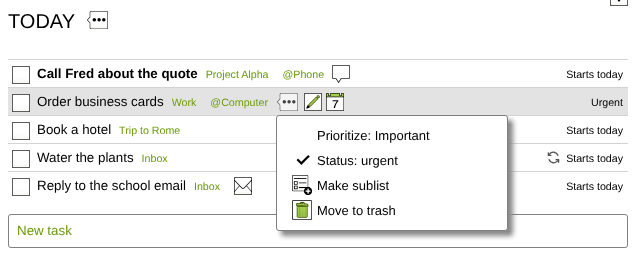
The task stays on today's list
To keep a task on the list day after day, give it the status Urgent. It then always shows in the Today, Within 7 days and Scheduled overviews. As long as the task has no deadline it never shows in Overdue, and where the date usually is it says Urgent.
How to
Choose Status: urgent in the quick menu , or tick Urgent in Edit and save. Remove any deadline that doesn't apply, otherwise the date is shown instead of Urgent.

Tip! To get a whole list onto today's list, set Urgent on the list itself. To get everything in a context, for example @Soon, create a list with the status Urgent and the context @Soon. Tags work the same way.
The reminder email stays short
Tasks with the status Urgent are not included in the reminder email until they get a deadline that falls due. The email only holds what is due today or what it is time to start, so it stays short and doesn't repeat itself day after day. Today's list in SaveYourDay, with everything that is Urgent, can therefore be longer than the list in the email.