

Nested lists
Put lists inside lists, many levels deep. A flexible way to group projects, checklists and everything else.
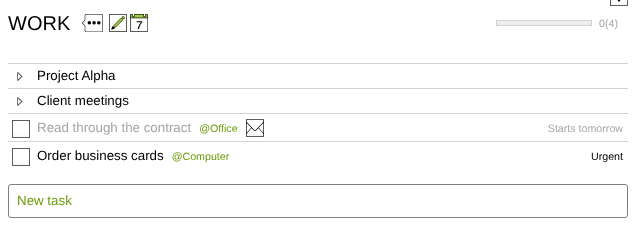
Nested lists are a flexible way to group tasks. A project can have a list per phase, a trip a packing list and a to-do list, and your job a list per customer. You build the structure that suits you.
- A list can have exactly the same properties as a task: dates, context, tags and comment. Read more under Smart list headings.
- Lists can be nested many levels deep.
- Turn a task into a list with Make sublist in the row's menu. If the list is empty you can make it a task again with Make task.
The arrow before a sublist unfolds it where you are, and Go to list in the row's quick menu opens it.

Everything works on every level
The row's menu has the same smart functions for a sublist as for a main list. You can, for example, copy, email, export or print any list, wherever it is. Read more under Copy list and Email the view.
Tip! Set start and end dates on the whole list instead of on every task. This works especially well for project lists and for checklists you follow at set times.