Smart formatting
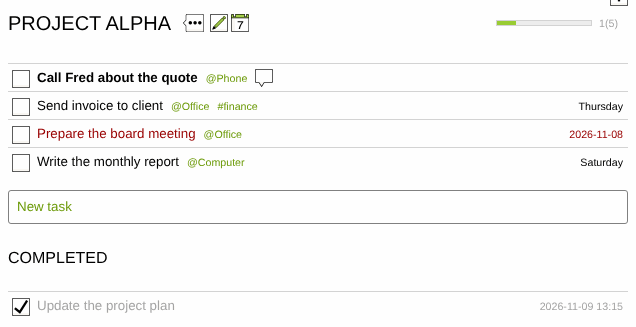
Overdue shows in red, important in bold and what hasn't started yet in grey. You see at once what matters right now.
Tasks are formatted by their properties, so you quickly see what is overdue, important or not relevant yet. This goes for both tasks and whole lists.
- Overdue – the due date has passed: the task and the date are shown in red.
- Important – the task is shown in bold.
- Start date ahead – the task is shown in light grey until the start date comes.
- Completed – the task is shown in light grey.
- Other tasks are shown in black.
Example: the VAT returns
Anton files a VAT return every month. He writes all of the year's returns in the list Finances and sets a start date a few days before each last day. In the list only the return that is due now stands out; the rest are grey. Anton keeps track of everything coming up, but the list feels short, and he is reminded in time.
Listbanken has ready-made lists you can download and try.