

Export
Export a list, the Inbox or a view to Excel with one click, or download everything you have in SaveYourDay as a zip file.
Sometimes you want your tasks outside SaveYourDay: as notes for a meeting, to do some sums in Excel or as a copy of your own. Then you export the view to an Excel file (.xlsx) with one click.
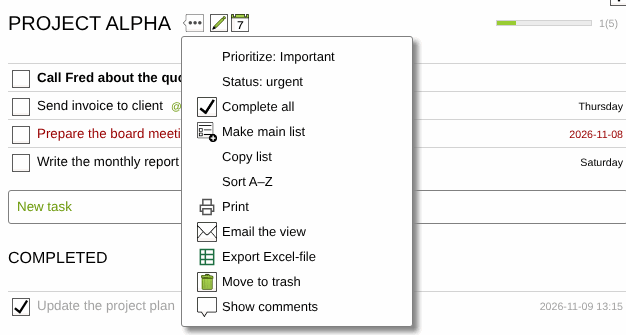
Export a view
Open the quick menu by the heading and choose Export to Excel. In a list, the list's quick menu also has Export Excel-file. The file downloads straight away.

You can export a list, the Inbox, All lists, a context, a tag and the overviews. When you export a list, all its sublists and tasks come along, completed ones too. In an overview, what the overview shows is exported. In Within 7 days you export one day at a time from that day's heading.
What the file holds
The file has one row per task or list. The columns show, among other things, which list the task is in, dates, context, tags, whether the task is important or done, and the comment. The Id and Parent id columns show how the lists fit together, so the file can be imported again.
Download everything
To get everything at once, choose Account settings in the account menu and then Download all data under My data. You get a zip file with all your lists and tasks as Excel, Markdown and JSON. The trash is not included.
Tip! An exported list has the same columns as the import template. Change the file and import it again, for example to turn a checklist into next year's.